Yes, you can add a virtual card to PayPal. PayPal links a virtual card the same way as a plastic one: you enter the card number, expiry date, security code and billing address in your PayPal Wallet, and PayPal may confirm it with a small temporary charge. This guide shows how to add a virtual card to PayPal step by step, how PayPal confirms it, and why a PayPal card is declined. It ends with how to use a ZikCards US virtual card for PayPal.
Can you add a virtual card to PayPal?
Yes. A virtual card has a real card number, expiry date and security code, so PayPal treats it like any other Visa or Mastercard. What PayPal checks is the card itself: that the details and billing address are right, that the card can be confirmed, and that the issuer approves the charge.
ZikCards cards can be added to PayPal accounts in the United States and in other countries. PayPal runs its own checks on every card and account, so no card provider can promise acceptance. A working virtual card for PayPal, with the right billing address, removes the usual reasons a card is refused.
Virtual credit card, debit card, Visa or Mastercard for PayPal
People search for a virtual credit card for PayPal, a virtual debit card for PayPal, or a virtual Visa or Mastercard for PayPal. For PayPal, the brand matters more than the label:
- Visa and Mastercard are the networks PayPal accepts most widely. Both work the same way in your Wallet. See our guides to a virtual Visa card and a virtual Mastercard.
- A virtual credit card from a bank spends money the bank lends you. Read what a virtual credit card is.
- A virtual debit card spends money you already have. Read what a virtual debit card is.
A ZikCards card sits between the two: it is issued on a US credit BIN, loaded from your balance, with no credit line. It spends only what you put on it, and there is no bill and no credit check.
How to add a virtual card to PayPal, step by step
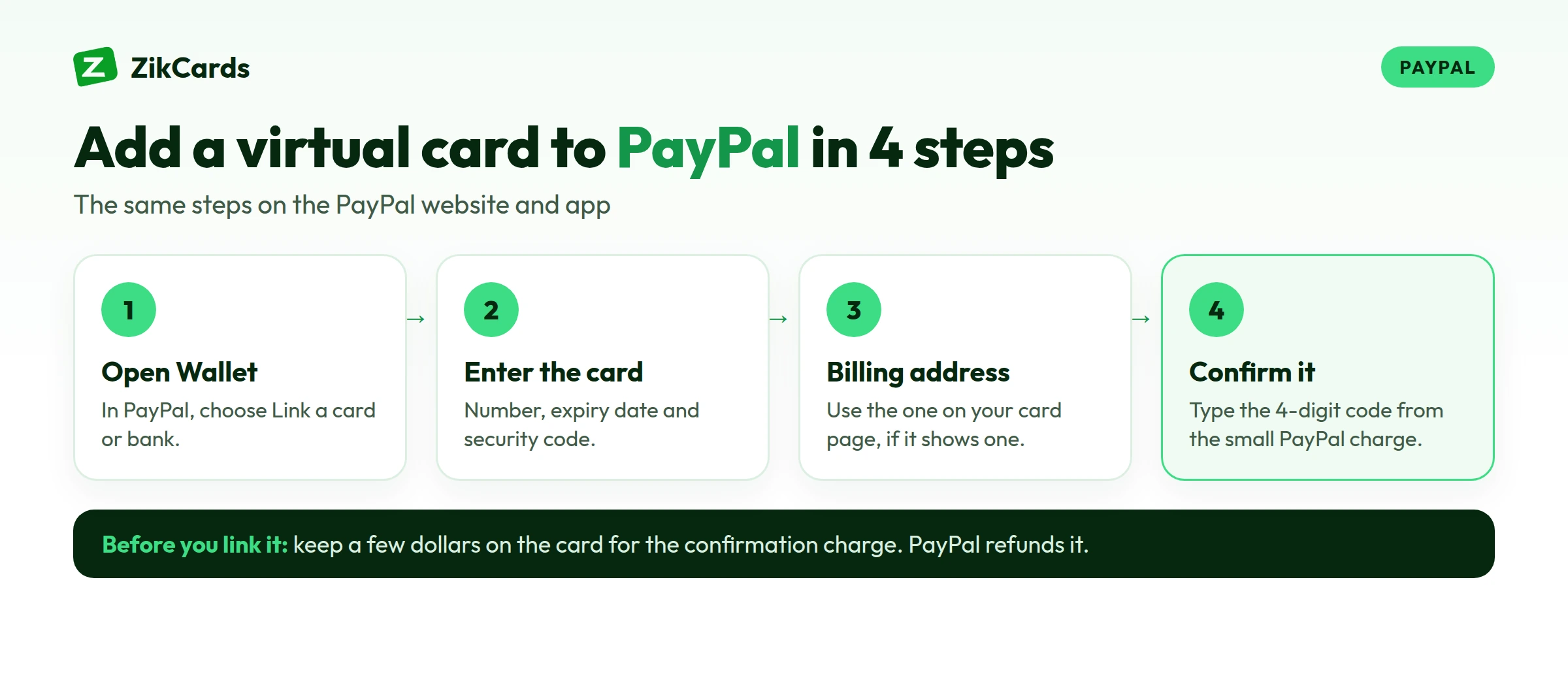
On the PayPal website or app, adding a virtual card takes about two minutes:
- Log in to PayPal and open Wallet.
- Choose Link a card or bank, then Link a debit or credit card.
- Enter the card number, expiry date and security code (CVV).
- Enter the billing address. If your card page shows a billing address, use exactly that one, not your home address (why the billing address matters).
- Save the card. If PayPal asks you to confirm it, follow the next section.
How PayPal confirms a new card
PayPal may confirm a new card with a small temporary charge that carries a 4-digit code. PayPal's help pages say the code appears in the charge's description, in the form PayPal*1234 CODE or PP*1234 CODE, and that PayPal refunds the charge once the card is confirmed. Some cards are confirmed automatically and skip this step.
- Keep a few dollars on the card, so the small charge can go through.
- Look for the PayPal charge on the card's Transactions page in ZikCards. Its merchant name may carry the code.
- In PayPal, open Wallet, select the card, enter the 4-digit code and confirm.
If you asked for more than one code, use the latest one. If you cannot see the code on the card's Transactions page, contact our support and we will help. PayPal says it cannot give the code by email or phone.
PayPal card declined? Why it happens
When a PayPal payment with your card fails, PayPal's help pages point to the same few reasons:
- The card issuer declined it. PayPal is not told why. With cards from outside the US, the reason is often a block on international or online payments.
- The details are out of date. An expired or closed card, or a billing address that does not match the card's own.
- Not enough money on the card, or a payment above its limit.
- The card is not confirmed yet. If PayPal shows a "Confirm card" link, the card cannot be used until you confirm it.
- PayPal's own security checks or a limitation on your PayPal account, which must be resolved with PayPal first.
PayPal's own advice is to check the card details and billing address, confirm the card, ask your card issuer, or pay another way. For decline messages outside PayPal, see our guide to a card declined online.
How to use a ZikCards card with PayPal
ZikCards gives you US-issued Visa and Mastercard virtual cards, loaded from your balance, which you fund with USDT or USDC. No bank account is needed, and the first card takes about 5 minutes:
- Create your account and verify once with a photo ID and a short selfie on your phone. Most checks are approved automatically within minutes.
- Add USDT or USDC to your balance. New to this? See how to buy USDT and which network to send on.
- Create a card. The Issue card page shows each card's fees, and whether it has its own billing address, before you pay.
- Load what you plan to spend, plus a few dollars for PayPal's confirmation charge and the $1 that stays on each card while it is open.
- Link it in PayPal as above, with the billing address from the card page if it shows one, and confirm it.
If you also hold a PayPal balance, PayPal may use it first. You can choose the card at checkout, or set it as your preferred way to pay. Each payment is a normal card payment, so the card needs enough on it every time.
Fees to know
Creating a card costs $5, once. Moving money from your balance to a card costs 3%, and top-ups under $100 also carry $1, so loading more at once costs less per dollar. Adding money to your balance costs from $1 + 1%, depending on the network. There is no monthly card fee. Some cards charge a small fee per payment. A charge that settles outside the US carries the card issuer's cross-border fee. Each card's Fees show both before you create it. PayPal may also convert currency at its own rate if your PayPal account uses another currency. Every figure is on our pricing page.
Keep PayPal payments working
- Keep the card open while PayPal uses it, especially for subscriptions paid through PayPal, such as Spotify (see Spotify payment methods).
- Top up before a renewal, so the payment does not fail.
- Don't freeze the card PayPal charges unless you want payments to stop: a frozen card declines everything.
- Refunds go back to the payment method you used, so keep the card open until an expected refund arrives (how refunds work).
- One card for PayPal keeps those payments apart from your other subscriptions (one card per subscription).
Frequently asked questions
Can I use a virtual card for PayPal?
Yes. PayPal links a virtual card like any other card: card number, expiry date, security code and billing address in your Wallet. PayPal runs its own checks on each card, so no card provider can promise acceptance.
Can I add a US card to a PayPal account outside the US?
ZikCards cards can be added to PayPal accounts in the US and in other countries. Use the billing address shown on the card page, if the card has one, and confirm the card when PayPal asks.
Why is my PayPal card declined?
Usually the card issuer declined it, the billing address or details do not match, there is not enough money on the card, or the card is not confirmed yet. PayPal's own security checks or an account limitation can also stop a payment.
Where do I find the PayPal code to confirm my card?
In the description of a small PayPal charge on the card, shown as PayPal*1234 CODE or PP*1234 CODE. On a ZikCards card, look on the card's Transactions page. PayPal refunds the charge after you confirm.
Does PayPal charge to add a card?
Adding a card is free. The small confirmation charge is temporary and PayPal refunds it once the card is confirmed.
Can I link a card to PayPal without a bank account?
Yes. A ZikCards card is funded with USDT or USDC, so you can link it to PayPal without a bank account. See our guide to a virtual card without a bank account.
Want a card ready for PayPal today? Create your ZikCards account. See every fee on our pricing page.
Visa, Mastercard, PayPal and Spotify are trademarks of their respective owners. ZikCards is not affiliated with or endorsed by them.